ThreadsGrab Image Downloader is for quickly getting pictures from Threads posts, and it gets them in their original, full size. It’s for anyone who wants to download photos from Threads easily and be sure they’ll still look good. Threads itself doesn’t have a way to download pictures, so a lot of people use screenshots. Screenshots don’t look as sharp, and you frequently lose little parts of the picture. This downloader gets around that by letting you get the actual image file itself.
Follow These Simple Steps to Download Threads Images
1
Click on Dots
Open Threads App or Website and click on three dots (⋮) on the post containing the image.
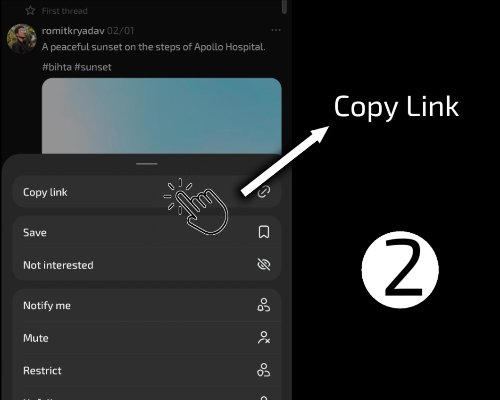
2
Copy Link
Select the "Copy Link" option from the menu that appears on your screen.
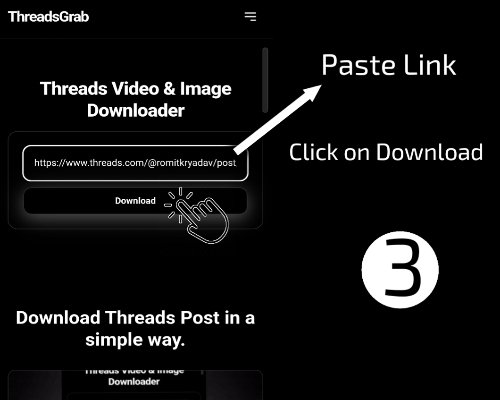
3
Paste Link
Paste the copied link into the input box at the top of this page and click "Download" Button.
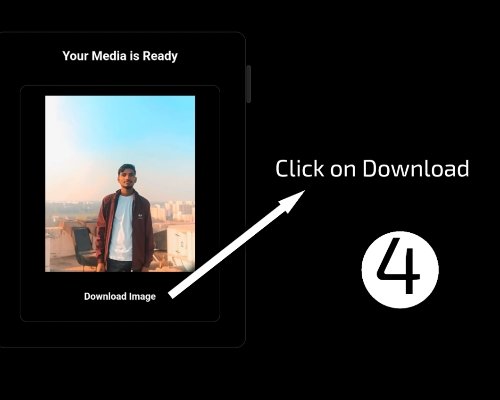
4
Save to Device
Click the final download link button to save the high-quality image to your device.
Download Multiple Images from a Single Threads Post
In most cases, there are multiple images in one post on Threads. Downloading all images one by one can take some time. Not only can it take time, but it can also result in missing images and poor quality images. In ThreadsGrab, all images from a single post are detected and shown at one place. The images will be previewed, and then individual images downloaded at full resolution.
The Difference Between Preview Images and Original Images
Here’s the thing that nobody really knows about or explains well: Most platforms like Threads will actually store multiple versions of the same image: one small preview version for fast load times, and one full-sized version stored separately. Low-quality tools will grab whatever is first in front of them, which is usually the preview version. This tool doesn’t make that mistake because it targets the source instead of the preview layer. That one difference is why the quality is maintained.
Speed Isn’t Optional. Speed Is the Point.
Let’s be honest. Nobody uses a picture downloader for a website because it’s fun. You want a result. The longer it takes, the more miserable the experience. And the vast majority of sites get it wrong by piling more and more unnecessary script, ad, animation, and tracking clutter onto the page. The more clutter, the slower the actual function. This thing does away with all of that. The process is simple. You paste a link. The system processes it. You get your pictures. No waiting loops. No fake progress bars. No unnecessary clutter masquerading as features.
No Accounts, No Barriers, No Data Collection
I think one of the most frustrating aspects of many modern web tools is the unnecessary friction. You open a downloader, and before you know it, you have to deal with sign-in requirements or hidden limitations. There is no reason for this to happen here. You are downloading a publicly available image from a publicly available post. There is no need for you to sign in or store data. And so you don’t have to. There are no sign-in requirements. There is no tracking. There is no storing of the link you paste for later use.
The Real Use Cases (Not the Obvious Ones)
The obvious assumption is that image downloaders are for casual usage, but there’s more. There are actual use cases where quality and accuracy matter. Content creators study visual trends and require the originals for reference. Designers collect inspiration and require images without compression artifacts. Marketers study visual content patterns and require consistent data. The problem in all these scenarios is the same: screenshots won’t help. You require the actual image, without modifications. And this is where a real downloader comes in handy.
Threads Image Downloader Comparison – Which Tool Works Best?
You’re probably here because you’re looking to download images from Threads. And you’ve probably noticed that most tools out there look more or less the same. Well, the truth is that they’re similar in functionality, but the overall feel can be quite different. This is a comparison of the general process of using a Threads image downloader compared to other tools, based on real-world usage scenarios.
If you need more than just an image downloader, we have more free tools for Threads users below. Each of our tools has been built to keep the process as simple and quick as possible.
Why can't the downloader detect images from the Threads post?
This issue arises when the provided Threads post link is not valid or complete. Ensure that the correct public Threads post link has been copied. The downloader cannot access private or restricted content.
The image is not downloading on my phone. What should I do?
If the image is not downloaded, long press on the image. A menu will appear on the screen; select “Download image” or “Save image.” You can also use another browser like Chrome or refresh the page.
Can I download images from reposted Threads posts?
Yes, you can download images from reposted threads posts provided the post is public. This is because the downloader will access the images from the source, and if the content is available, it can be downloaded.
Why is the download taking too long?
Downloads can take time if the internet connection is unstable, the images in the post on Threads are high resolution, or the server is busy. A few seconds of waiting can resolve the problem.
Why does the downloader show an error after pasting the link?
The downloader may display an error message if the link is invalid, expired, or if the post is not publicly visible. Make sure you have copied the complete URL for the Threads post and that the content is still available.
Why do downloaded Threads images have different file names?
The downloaded image might have a different file name because the image will be saved using the original file name from the server or a system-generated file name. This does not impact the quality or content of the image.
Is there any limit on downloading Threads images?
There is no set limit on downloading Threads images. However, performance may change based on server load or network conditions.
Why is the image opening in a new tab instead of downloading?
Some browsers have the option set to load the image in a new tab instead of downloading it directly. This is perfectly normal. To save the image, you can right-click the image and select “Save image as.”